
Using Spreadsheets to Organize My Finances as a Part-Time Sports Photographer in Canada
DISCLAIMER: This blog is only intended to show how I organize my finances and is in no way, shape or form financial or tax advice.
Google Sheets - Pick's Pics Balance Sheet 2026
Excel - Pick’s Pics Balance Sheet 2026
As a part-time photographer, separating my finances between photography and my full-time job is important to me. Not only does it allow me to see how much photography is bringing in, but it also lets me organize things like mileage and invoices (primarily for tax purposes). As a sole proprietor, keeping up-to-date on my finances using this spreadsheet has allowed me to do my taxes in a very short amount of time and ensures that I can budget correctly for any gear that I have my eyes on.
From the beginning of my photography journey, I wanted to keep any income I made from photography separate from my personal income so that I would not be pouring endless amounts of money from my full time job as a nurse into my hobby (at the time). Keeping things separate incentivised me to work hard towards earning money with photography so that I can reinvest it later. Other than the initial purchase made with my “personal” money, I have made almost all of my photo-related purchases with photo-earned money, something that I’m very fortunate to be able to do.
I developed this spreadsheet over the past few years in the hopes of keeping everything as organized as possible, while making tweaks and adding new components as needed. I intend to continue to make changes in the future but as of right now this is the most up-to-date 2026 version. This whole process runs a lot smoother if you have a separate bank account (like a savings account or a totally different account) to really separate personal and photography money.
I encourage anyone who uses this spreadsheet to make their own tweaks to it!
HOME TAB
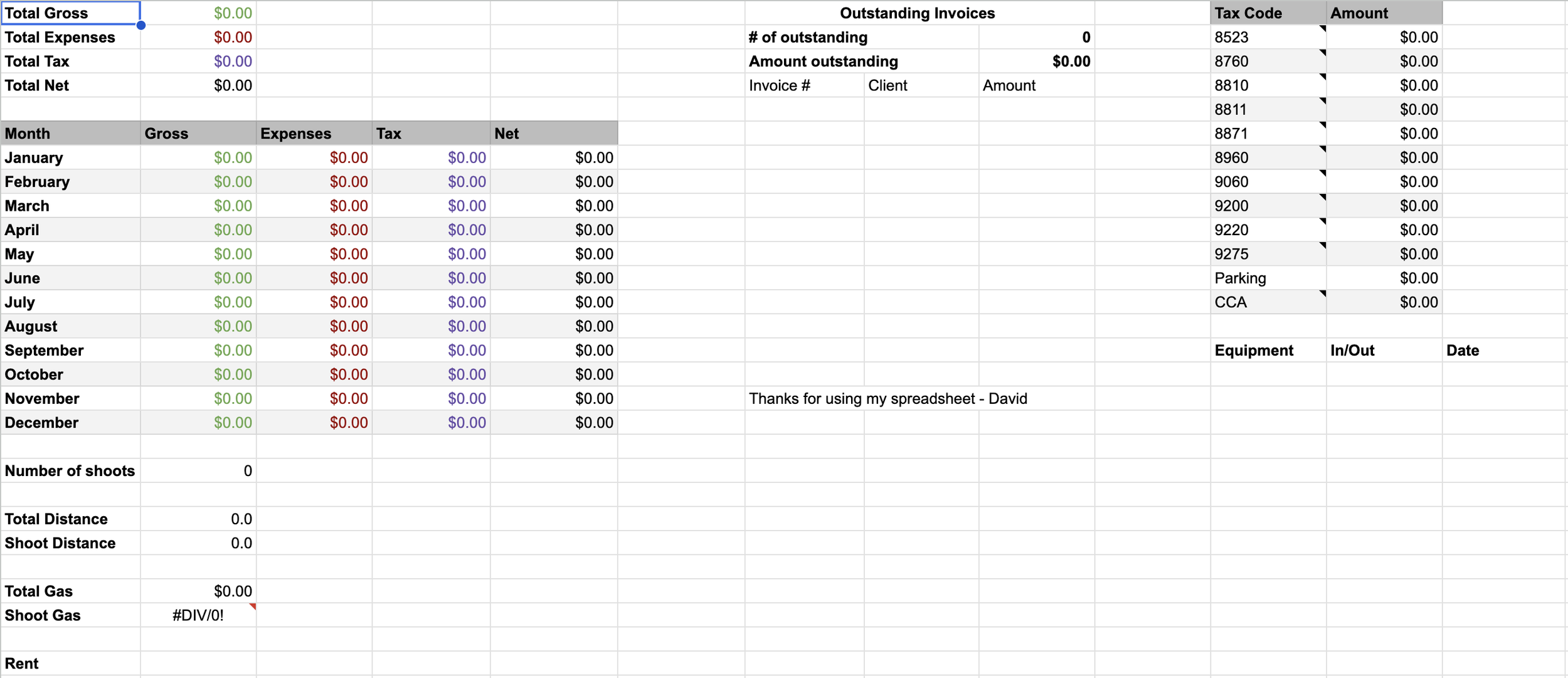
The spreadsheet is fairly user friendly (in my biased opinion). I wanted the home page to show a snapshot of everything, including but not limited to; total gross, total net, total tax and total expenses, a snapshot month by month, number of shoots, mileage, gas, rent, outstanding invoices, tax code breakdown and large equipment ins/outs. The terminology may not be the most appropriate but that's just the language that works best for me. There is a tab for each month and any data entered into the appropriate cells will be combined and shown on both the month tab and the home tab. Data in the mileage and gas cells may look out of wack as you use them but I promise at the end of the year it calculates properly.
MONTH TAB
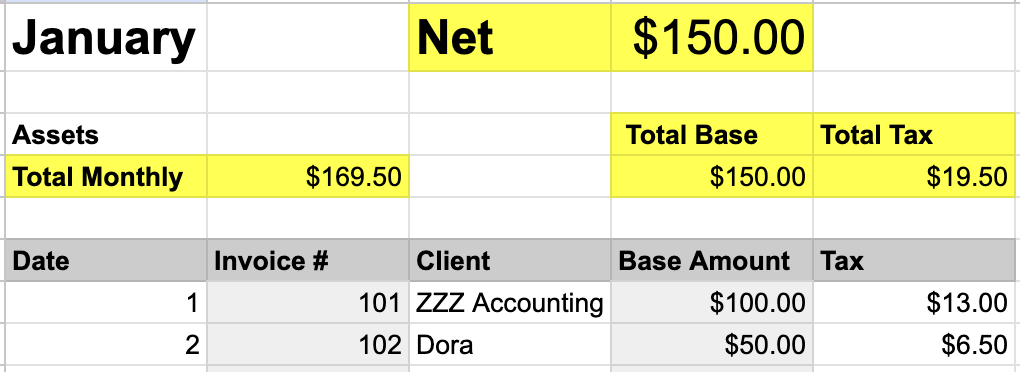
ASSETS: This is the fun section where any money you make will be added up. There is a space for date, invoice number, client, base amount earned and tax charged (if you are required to charge tax). A total monthly amount is calculated and separated into total base earned and total tax charged.
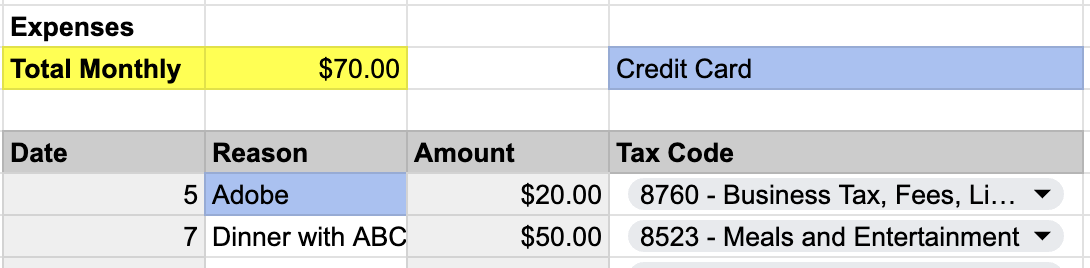
EXPENSES: This section, of course, is for inputting any expenses that have been incurred in relation to any photography needs. You can figure out for yourself what qualifies as a photography expense. Personally, I highlight any expense that I use a credit card for so that it is easier for me to identify the purchase if I need to look online for statements in the future. You will notice that there are tax code drop-down tabs as well. These tabs are intended to be used to make filing your taxes at the end of the year much easier and efficient. I have included the tax codes that are relevant to my work and are specific to the Canadian tax code.
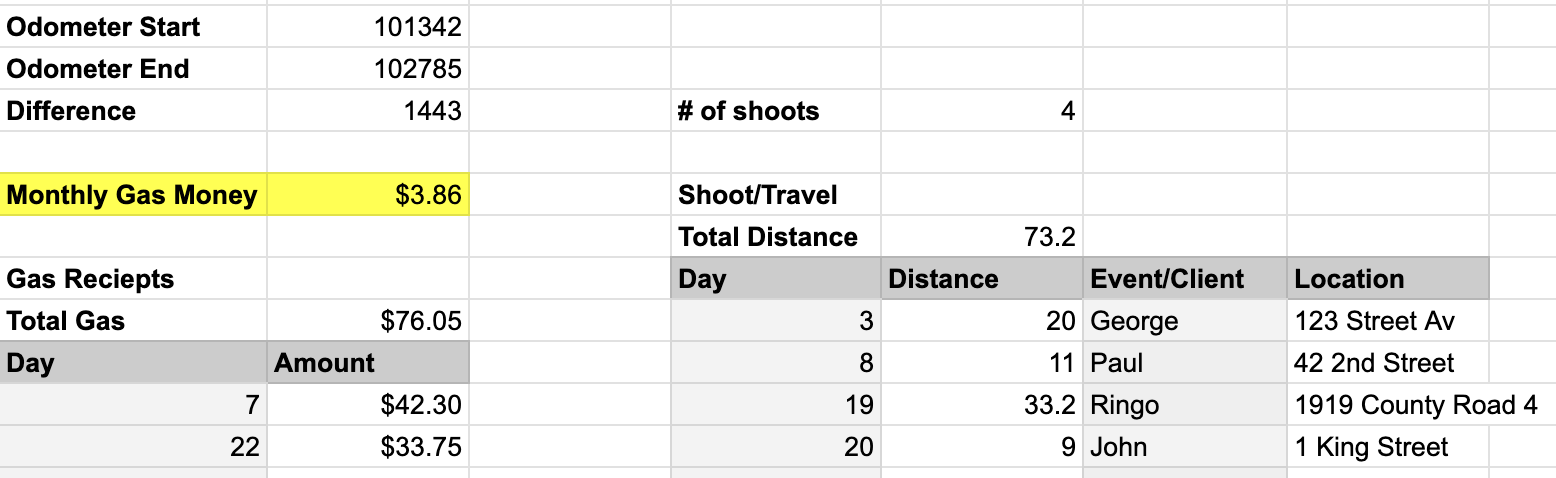
MILEAGE: This part of the spreadsheet helps you keep track of any driving you would do for photography related trips including monthly odometer readings, gas receipts (separate from expenses), and travel distance details to each specific shoot. These numbers may show up a little wacky on the home page but are calculated properly at the end of each year.
TIPS: I change the colour of the month tab at the bottom once all information from that month has been inputted. This helps me to stay more organized and lets me know at the end of the year that all of the data has been entered.

I make a note at the bottom of the home page if I moved any money in or out of my photography bank account so that I am not wondering where any money went.

I hope you find this spreadsheet as useful as I do. Let me know how it works for you. If I make any major changes to the spreadsheet in the future I will update this blog. See below a downloadable google sheets and excel version of the spreadsheet.